Cisco ISE monitoring with Topologix
Security
Two views of Cisco ISE from one integration: the live remote-access-VPN session directory — which user is behind which VPN IP — via the Monitoring (MnT) REST API, and platform health (deployment nodes, licenses, certificate expiry) via the ISE Open API. Plain HTTPS with Basic auth on the admin interface — no ERS, no pxGrid certificates or WebSockets.
Requirements
- An internal ISE admin account in the Super Admin, System Admin, or MnT Admin group — MnT rejects AD-backed admin logins, so the account must be local to ISE. Topologix only reads the session directory and health endpoints; no config or CoA changes are ever issued.
- HTTPS reach to the MnT node’s admin interface on port 443 (not ERS on 9060, not pxGrid on 8910) — through a proxy agent inside the management network, picked per source under Run on.
- For the Platform health scope: the ISE Open API enabled under Administration → System → Settings → API Settings (ISE 3.x).
1 · Set up the integration
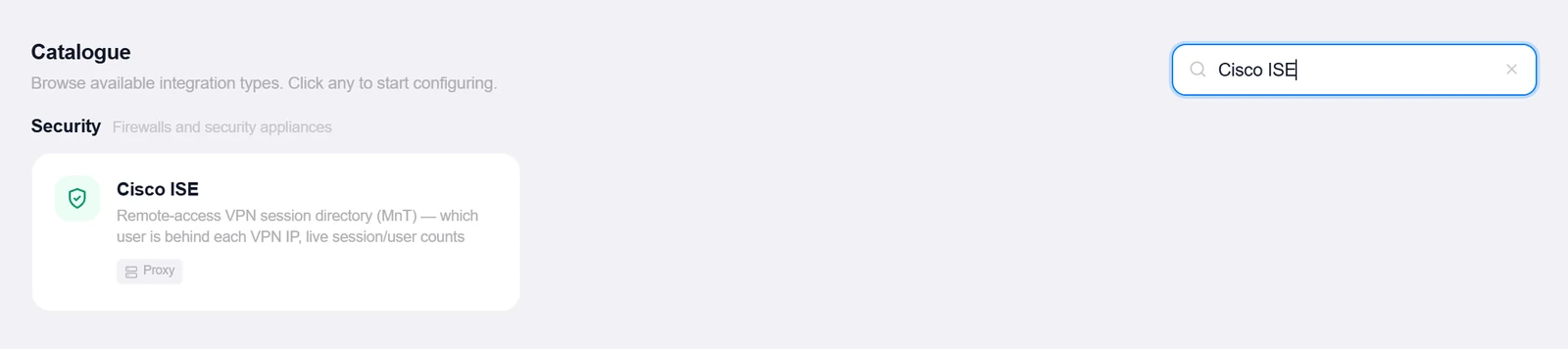
- Open the Integrations pageClick Integrations in the toolbar and pick Cisco ISE from the catalogue.
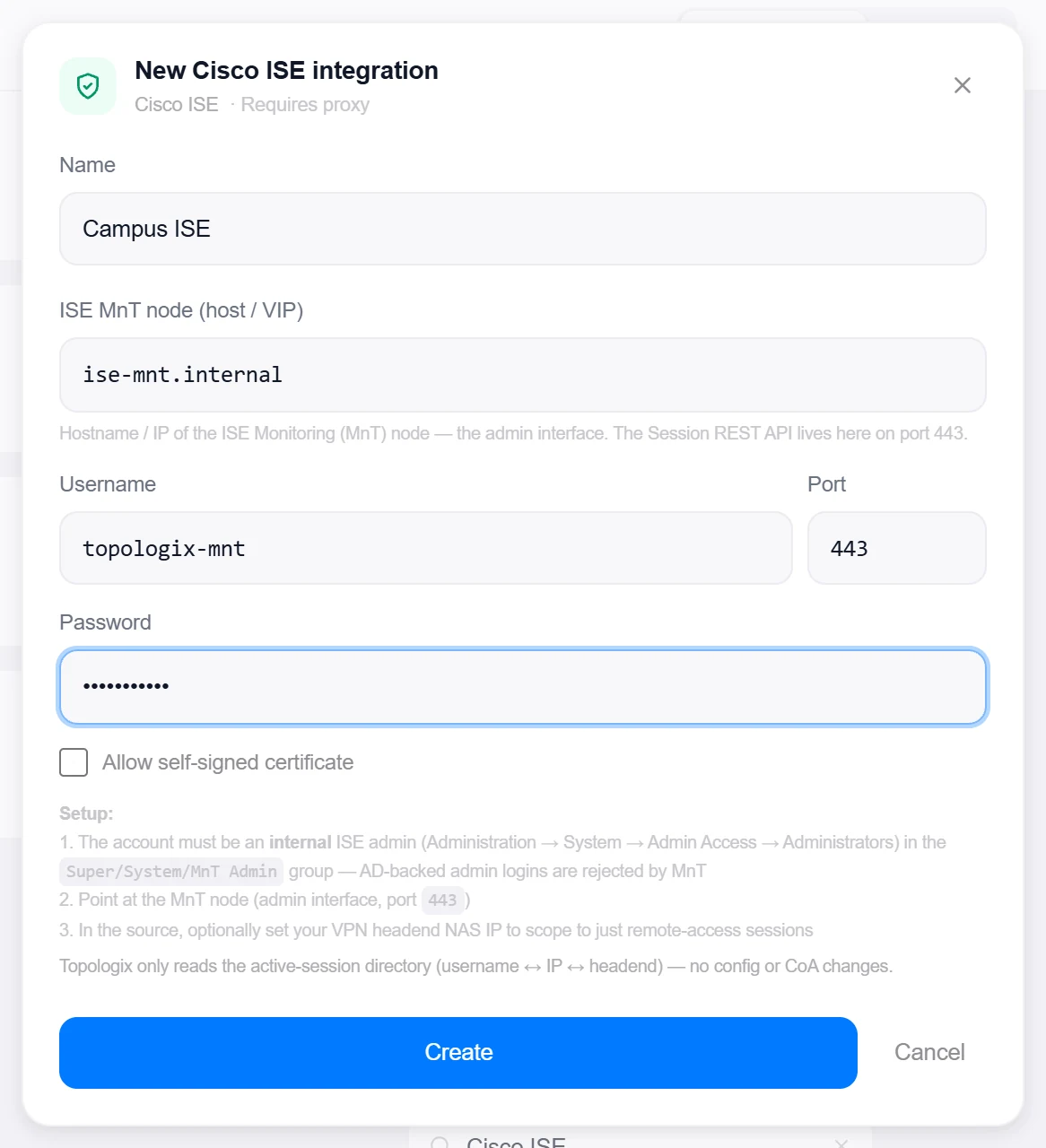
- Enter the MnT node addressISE MnT node (host / VIP), Username, Port (default 443), and Password; tick Allow self-signed certificate for the usual self-signed admin cert.
- Create, then verifyClick Create, then reopen the integration and click Test — it calls the MnT ActiveCount endpoint and reports "Connected — ISE MnT reachable, N active session(s)". An auth failure spells out the internal-admin requirement.
2 · Add it to a flow
- Select the VPN or ISE nodeClick the node, open Metrics, then + Add and choose the ISE integration.
- Pick the scopeTwo tabs: VPN sessions or Platform health — one source per view.
- Scope and saveIn VPN sessions mode, optionally enter your VPN headend’s NAS IP to keep only that concentrator’s sessions (blank = all active ISE sessions). Add an optional label, set the interval, and click Add Source.
3 · Beyond presets: custom queries & the All-Services alarm
VPN sessions
The active-session directory: each row maps a username to its assigned (inner) IP, the client’s outer IP, and the NAS/headend that authenticated it, with live totals for active sessions and distinct users.
- The optional NAS IP filter scopes the card to one VPN concentrator — filtering happens over the full active-session list, because MnT’s by-IP endpoints are single-session lookups, not device filters.
- The rendered list caps at 200 rows; the session and user counters always reflect the true total, with a truncation marker when the cap bites.
Platform health
ISE-as-infrastructure vitals over the Open API: every deployment node with its roles, services, and connection status (down nodes counted), license tiers with compliance state and consumption, per-node system-certificate expiry with the soonest one headlined, plus the live session count as an AAA-load signal.
- License and certificate reads are best-effort — a node or endpoint that refuses them degrades to fewer rows instead of failing the source.
- Certificates are sorted soonest-expiring first and capped at 8 on the card.
Good to know
- MnT throttles its API — keep the polling interval modest; this is a session directory, not a per-second counter.
- Session-row field names vary slightly between ISE releases; the parser handles both the newer and older MnT XML shapes (confirmed against ISE 3.4).
- Lab path: Cisco publishes a 90-day evaluation OVA of ISE. It is sized like production — 16 vCPU / 64 GB RAM — so it needs a real virtualization host, but it is the honest way to try this integration without a production deployment.
More Security integrations
See it on your own infrastructure
Book a demo and we will walk you through Topologix with your systems in mind: on our cloud, or self-hosted in your own network.