Server Vitals monitoring with Topologix
Infrastructure & Networking
Host vitals with no Prometheus server — Topologix scrapes a node_exporter (Linux) or windows_exporter (Windows) /metrics endpoint directly and reduces it to CPU, memory, swap, disks, network, and uptime, with opt-in families for disk I/O latency and queues, service and process watches with expected states, Windows role counters, and custom perfmon counters. Credentials live on the integration; each server is a metric source addressed by IP.
Requirements
- An exporter on each host. The integration builds a ready-to-run bundle — the official node_exporter (Linux, port 9100) or windows_exporter (Windows, port 9182) plus an install script that registers it as a service — or point it at an exporter you already run.
- HTTP(S) reach from the Topologix server or a proxy agent to the exporter port. Optional Basic auth (HTTPS) — the generated password is baked into the downloaded bundle’s TLS web-config so both ends match.
1 · Set up the integration
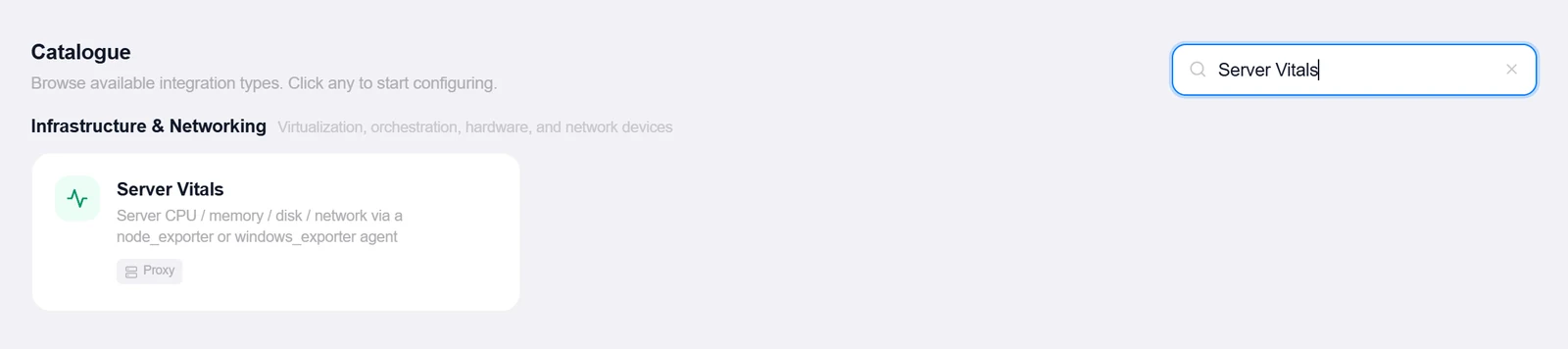
- Open the Integrations pageClick Integrations in the toolbar and pick Server Vitals from the catalogue.
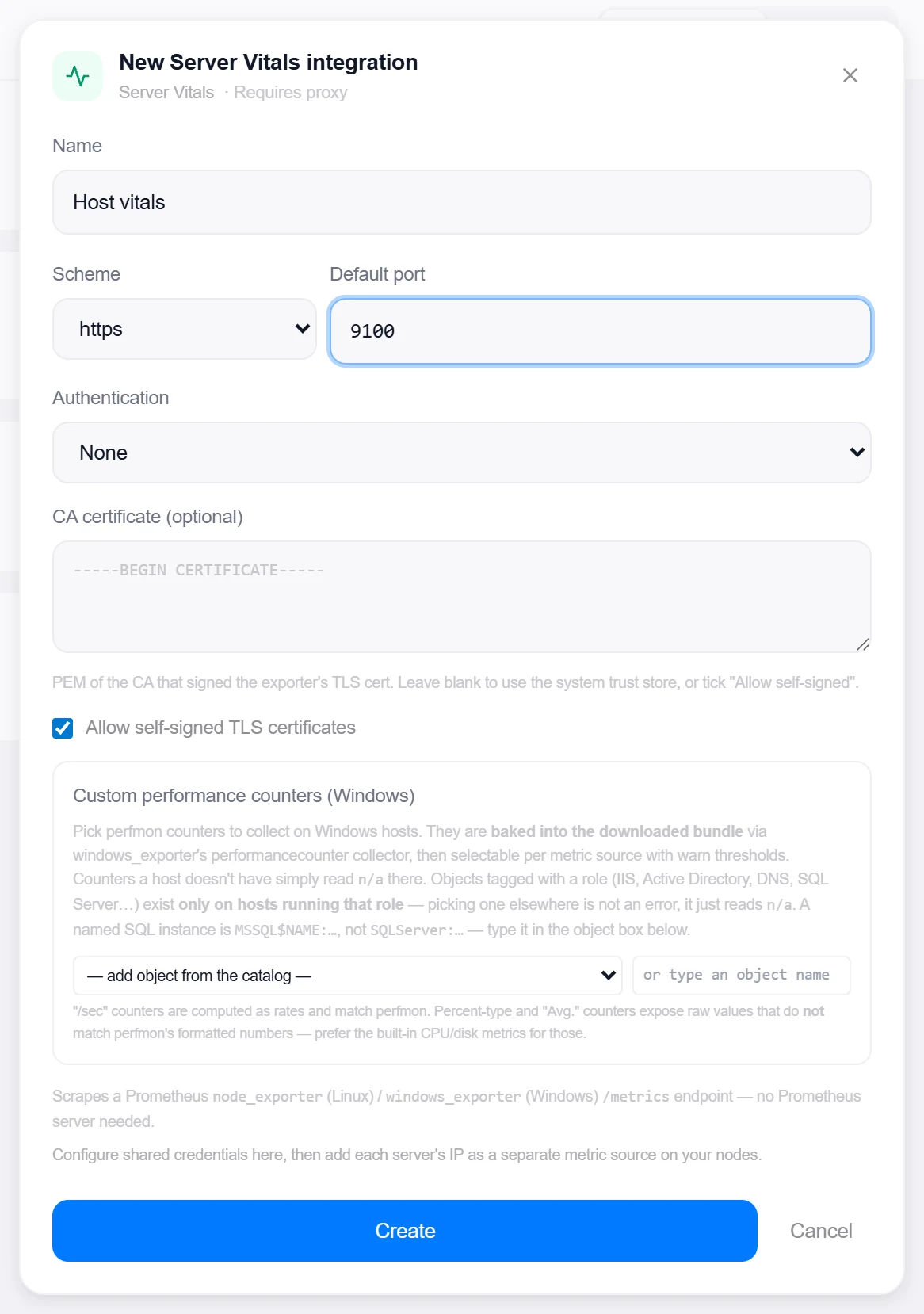
- Set the transport defaultsScheme, Default port (9100), and Authentication — None or Basic auth (HTTPS) with a Generate button for a strong password. An optional CA certificate (PEM) or the Allow self-signed TLS certificates toggle covers the TLS side.
- Create, then verifyClick Create, then reopen the integration, enter a server under Test Host, and click Test — it reports which exporter answered, the series count, and flags the exporter’s TLS certificate when it’s near expiry.
- Download the exporter bundleDownload exporter setup builds a Linux or Windows bundle with the current settings baked in. The Windows bundle can also bake role collectors (Active Directory, DNS, DHCP, DFS-R, SMB), the software inventory collector (section 4 — ticked by default) and a Domain Controller agent that publishes deep AD checks through the exporter — no WinRM, no inbound surface. The Linux bundle can carry the files collector (section 3) that ships log files — a netconsole console host’s kernel lines — to a proxy’s syslog listener.
2 · Add it to a flow
- Select the server nodeClick the node, open Metrics, then + Add and choose the Server Vitals integration. Enter the Server Host (with an optional per-source port override).
- Set thresholds and extra familiesCPU / Mem / Disk % alert thresholds default to 90 — a CPU breach turns the node red, memory/disk warn. Additional metrics opts into disk I/O latency, disk queue length, service watches (Windows services or systemd units, each with an expected running/stopped state), processes (Windows: top-N by memory; Linux: named process-exporter groups with expected states), Windows role families, and custom counters; a drive filter declutters multi-volume hosts.
- SaveSet the interval and click Add Source. The card shows CPU (with core count and model), memory, swap, per-filesystem bars, network throughput, and uptime, plus every family you opted into — a watched service or process out of its expected state raises the mismatch alarm.
3 · Files collector (Linux)
An optional part of the Linux bundle that tails log files on a schedule and ships their new lines to a proxy’s syslog listener — the same channel network gear and rsyslog use, so the lines are counted, baselined and kept exactly like any syslog line. It was built for a netconsole console host: the machine where your VMs’ kernels send their console over UDP and rsyslog writes /var/log/netconsole/<sender-ip>.log. Installed there, it turns a kernel panic in any of those files into a crash episode and a critical finding on the right VM (see the Syslog receiver guide, Kernel console (netconsole)). It is a syslog-shipping collector, not a Prometheus textfile collector: only its own health goes through the exporter.
Turn it on
- Have a syslog listenerA Syslog receiver integration on a proxy (TCP on), and on the flow a syslog source on it with Service → Host name and Error type → MSGID — the collector’s key becomes the host name, so each file’s machine is its own row.
- Fill in the blockIn the Server Vitals integration, tick Files collector (Linux) and set: Paths or globs (one per line), Every (seconds), Format — netconsole (kernel lines), which fixes the app name to
kernel, or text (any log) with an app name of your choice (defaultfiles) — the Identity rule, the Proxy host and TCP port, and optionally Ship existing content the first time a file is seen. The settings are checked when you save; a bad path or pattern is refused with the reason. - Type the proxy addressThe form prefills the syslog listener’s port and names its proxy, but the proxy host must be typed by hand — Topologix does not know the address your console host reaches the proxy on.
- Download and installDownload exporter setup (Linux) with the block saved bakes everything into
files-collect.sh; runinstall.shas root on the console host. Changing a setting = save, re-download, re-run install.sh — nothing is pushed to the host afterwards.
What it reads, and when
- Paths: at most 16 absolute paths or globs (
/var/log/netconsole/*.log) — no spaces, quotes or... Schedule 15–3600 s (default 60). - It runs as root from a systemd timer (
topologix-files-collector.timer, first run 60 s after boot; without systemd, a/etc/cron.dentry with minute granularity), one instance at a time (flock). The script is/usr/local/bin/topologix-files-collect. - Per file it keeps a state file under
/var/lib/topologix-files—inode offset key shipped errors— so only new, complete lines are shipped. A file seen for the first time starts at its end (nothing old is replayed) unless the backfill box is ticked; a rotated (new inode) or truncated file starts over from the top. - At most 500 lines / 256 KB per file per run; the rest goes on the next run. A file’s offset advances only after the proxy accepted the lines — a failed delivery ships them again next time (and counts an error).
- Each line becomes one RFC 5424 message, octet-counted over one TCP connection per run: the rsyslog timestamp is kept,
#012/#011are decoded, an extended-netconsole level is honoured, and kernel lines are classified with the same keyword table the proxy uses, carrying[tpx@topologix file= key= keyBy= host= fmt=].
Which machine a line belongs to (identity)
The key rides as the syslog host name and is what the server matches to a VM, host or device (IP first, then the name). Four rules; patterns are POSIX ERE — write [0-9], [[:space:]], [A-Za-z0-9_]; \d \s \S \w \b and (?…) groups are refused.
| Rule | Default | Key |
|---|---|---|
| File name | ^([0-9.]+)\.log$, group 1 | A capture of the file’s base name — 172.16.38.155.log → 172.16.38.155. |
| Banner line | netconsole up: ([^ ]+) [^ ]+ ([0-9.]+) ->, group 2 | A capture of the netconsole banner (netconsole up: <fqdn> <if> <ip> -> …) — remembered per file and refreshed when a new banner appears. |
| Regex over lines | — (yours) | A capture of the first line that matches, remembered per file the same way. |
| Fixed value | — (yours) | Every line of every file is one key. |
- A key that does not match or is not 1–255 letters, digits,
. _ : -falls back to the file’s base name — a line is never shipped without a host name.
Requirements and install.sh
- Linux only — bash ≥ 4, GNU awk (gawk) and sed, GNU stat, flock, plus
sha1sumandtimeout, and a TCP transport: bash’s/dev/tcp, elsenc, elsesocat(the first that works is used and reported). install.shruns a pre-flight before it installs anything and stops with the missing piece; it warns (but continues) when the proxy port does not answer.- Not with the Domain Controller agent: the files collector and the Windows DC agent cannot ship in the same bundle — the form unticks one when you tick the other, the download refuses the pair, and install.sh refuses to run beside
ad-collect.ps1. - Windows is not supported yet — asking for a Windows bundle with the files collector is refused (“the Windows files collector ships in a later release”).
Health on the card
Every run writes topologix_files.prom into the node_exporter textfile directory; the server card of that host shows a Files collector section from it.
- Series:
topologix_files_collector_last_run_seconds,_last_success_seconds(0 = never),_lines_shipped_total{file},_errors_total{file},_offset_bytes{file},_backlog_bytes{file},_info{transport,target,fmt,key_by,every}; the bundle also markstopologix_agent_info{files_collector="1"}. - States: ok; warn when the last run or the last successful run is older than 2× the schedule; fail past 4×; configured but not installed when the integration has the block but the host reports no collector — re-download the Linux bundle and run install.sh. A textfile has no expiry, so these timestamps are the only liveness signal.
4 · Software inventory (Windows)
An optional part of the Windows bundle — ticked by default — that lists what is installed on the host for Infrastructure → Software, the server’s Software tab and the vulnerability matching. It is a textfile collector: a fixed, read-only script writes a file the exporter already serves, so nothing new listens, no credential is stored and Topologix only ever scrapes /metrics.
What it reads, and when
Everything the collector does was fixed when the bundle was downloaded.
sw-inventory.ps1runs as SYSTEM from the scheduled task Topologix Software Inventory — once a day and at startup (a 5-minute limit), and once at install.- The installed programs under the machine-wide Uninstall registry keys (64-bit and 32-bit views): name, version, publisher, architecture and MSI / EXE. Per-user installs (HKCU) are not read; system components, child entries and patches (Update for …, Security Update for …, KB entries) are skipped.
- The installed updates (
Win32_QuickFixEngineering— KB id and install date) and the OS build (product, display version, build and UBR —10.0.<build>.<UBR>, which the exporter’s own OS series lacks). - The SQL Server instance builds — each instance’s
Setup\PatchLevel(the installed cumulative update or GDR, with the RTM build and the edition), from the 64-bit and the 32-bit registry views. The Uninstall entry Microsoft SQL Server 20xx only shows the RTM build, so the instance build is what is matched. - The Office Click-to-Run build and update channel (
ClickToRun\Configuration: VersionToReport, Platform, ProductReleaseIds, the channel GUIDs — never a URL), the .NET Framework release and runtime file version (NDP\v4\Full+ the runtime assemblies), and the installed .NET shared runtimes (.NET, ASP.NET Core, Windows Desktop — the registry, then thedotnet\sharedfolders). - At most 1 500 programs, 500 updates, 32 SQL Server instances and 64 .NET runtimes, 128 characters a value; past a cap the list is marked truncated.
- It takes no parameters, changes nothing on the host, opens no network connection, and writes
textfile_inputs\topologix_sw_inventory.promatomically (a temporary file, then a rename).
In Topologix
The list rides the Server Vitals scrape of that host — there is no separate poll.
- Each Windows source becomes one host inventory on its Servers row, at confidence integration: the programs as Windows program entries, the KBs as Windows update, the OS with its full build.
- Applications Topologix recognises — browsers, runtimes, databases and common tools, Firefox ESR, Thunderbird, Notepad++ and Adobe Acrobat (Classic or Continuous track, read from its build) — and each SQL Server instance by its installed build are matched against NVD for CVEs like any other application. Office Click-to-Run (by its update channel) and .NET appear as their own components — Microsoft 365 Apps / Office (Monthly Enterprise Channel), .NET Framework 4.8.1, .NET runtime — for Microsoft’s Security Update Guide; an MSI Office 2016 stays a Windows program. Windows itself and its KBs are inventoried, not matched (NVD files Windows CVEs without build granularity).
- Nothing is stored while a host’s list is unchanged; a list not refreshed for 72 hours (the collector removed, the host gone) leaves with its inventory.
- The exporter serves the file on every scrape, so
/metricsgrows by roughly 30–60 KB on a typical server. A proxy sends an unchanged list to the server at most every 30 minutes; a host behind an older proxy is named in the Software view’s “update the proxy” note (a proxy that predates the SQL Server instance builds gets a note of its own).
Turning it off
Per host, or for the whole instance.
- Per host: untick Software inventory collector before downloading the Windows bundle and re-run its installer — it removes the task, the script and the file. By hand:
Unregister-ScheduledTask -TaskName 'Topologix Software Inventory'and deletesw-inventory.ps1and the .prom. - For the whole instance: Admin → Background workers → Software inventory: Windows programs (0) — the lists are dropped, new bundles leave the collector out, and the stored Windows inventories leave after 72 hours. Installed tasks keep running until a bundle downloaded while the switch is off is re-run on the host; after switching it back on, re-download (box ticked) and re-run the installer where the list should come back.
Good to know
- The custom-counter picker is fed by a catalog baked into the server — 232 counter sets / 4,330 counters generated from a live Windows host via
Get-Counter -ListSet *, plus a hand-curated server-role supplement (IIS, Active Directory, DNS, DHCP, SQL Server, …). Counters are collected by windows_exporter itself, so adding them means re-downloading the bundle and re-running install; a counter a host doesn’t have readsn/a, never an error. - CPU %, network throughput, and disk I/O are counter deltas between polls — the first sample shows no rate, every later one is a true per-second figure.
- Linux named-process watching needs process-exporter (bundled alongside node_exporter, port 9256); when it’s unreachable the section is omitted rather than firing a false alarm.
More Infrastructure & Networking integrations
See it on your own infrastructure
Book a demo and we will walk you through Topologix with your systems in mind: on our cloud, or self-hosted in your own network.