Active Directory monitoring with Topologix
Infrastructure & Networking
Domain controller health with inter-DC replication convergence as the headline signal — per-partner replication state plus core DC services (NTDS, Netlogon, KDC, DNS, DFSR, W32Time) — extended by a full health & security suite: per-DC checks, domain-scope checks (FSMO, backups, krbtgt age, RID pool), and privileged-group change detection, collected over WinRM, a DC-local agent, or plain LDAP.
Requirements
- WinRM collection: a low-privilege domain account in Remote Management Users + Event Log Readers on each DC covers most checks; dcdiag, secure-channel and backup checks additionally need local admin — without it they report n/a, not failures.
- LDAP collection: a plain domain user is enough — every read it makes is world-readable to authenticated users — and TLS is mandatory (LDAPS on 636 or StartTLS on 389). Local-agent collection: no credentials at all — the DC publishes results through its Server Vitals exporter.
- For WinRM, HTTPS on port 5986 reachable from the server or — DCs are usually LAN-only — a proxy agent on the domain network.
1 · Set up the integration
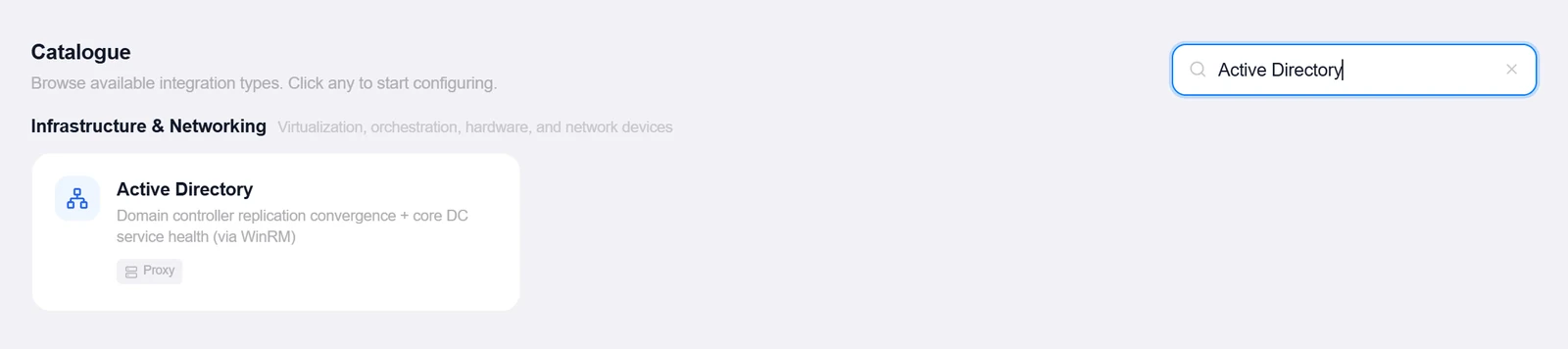
- Open the Integrations pageClick Integrations in the toolbar and pick Active Directory from the catalogue.
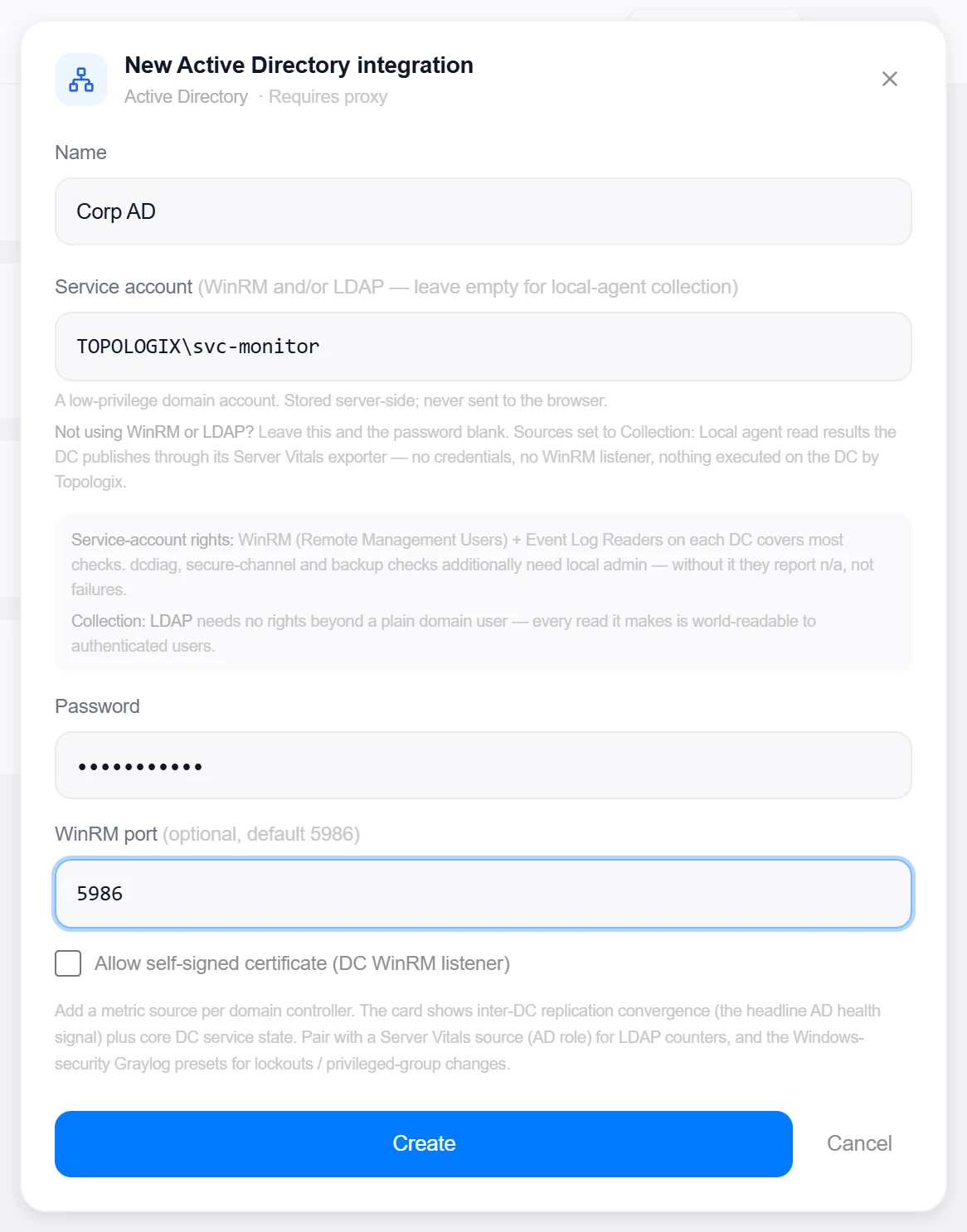
- Enter the service accountService account (e.g.
CORP\svc-monitor) and Password — or leave both blank if every source will use local-agent collection. Optional WinRM port (default 5986) and a self-signed-certificate toggle. - Pick the proxyConnect via proxy (recommended) routes WinRM/LDAP through a proxy agent on the domain network.
- Create, then verifyClick Create, then reopen the integration, enter a DC under Test DC host, and click Test to verify WinRM access. The test host isn’t saved — each DC becomes its own metric source.
Target on a private network? Route it through a proxy agent. Proxy agents run inside your network — behind NAT, on a management VLAN, in an air-gapped segment — and reach targets the Topologix server can't. The agent polls the server every 15 seconds for its assignments, runs the checks locally, and pushes results back every 5 seconds, so no inbound firewall rules are ever needed. Set a default proxy on the integration; every metric source can override it. If a proxy goes offline, its sources are marked stale within ~90 seconds and the last known values stay visible.
2 · Add it to a flow
- Select the DC nodeClick the node, open Metrics, then + Add and choose the Active Directory integration.
- Pick mode and collectionMode: DC health (replication, services, SYSVOL, disk, time, LSASS, dcdiag and event-ID counts for one DC), Domain scope (FSMO, DC inventory, backups, krbtgt age, RID pool, DNS scavenging, AdminSDHolder — one source per domain), or Privileged accounts (group inventory + change detection, one per domain). Collection: WinRM, Local agent, or LDAP. In WinRM mode, Discover DCs lists every DC in the domain — site, GC and RODC flags included — for one-click fill-in.
- SaveSet the replication-lag alarm (default 60 minutes), the interval, and click Add Source. The card leads with replication convergence — failures, consecutive-failure streaks, worst partner staleness — above the core-service states.
Live canvas screenshots for this integration require a real Active Directory environment, so this guide shows the configuration screens only — the flow steps above work exactly like every other integration.
Good to know
- Remote execution is allowlist-only: callers pass a collector key, never a command — only frozen PowerShell scripts from the built-in collector table can run, so the integration can’t be turned into arbitrary remote execution.
- Collectors run sequentially and each is caught independently — a failed collector degrades to n/a checks, never a dead card; only the mode’s first collector failing (transport down) errors the source.
- LDAP collection can’t see host-level state — services, disk, dcdiag and event counts read n/a there. Pair with a Server Vitals source (AD role) for LDAP counters, and the Windows-security Graylog presets for lockouts and privileged-group changes.
More Infrastructure & Networking integrations
See it on your own infrastructure
Book a demo and we will walk you through Topologix with your systems in mind: on our cloud, or self-hosted in your own network.